See how much Claude, ChatGPT/Codex and co. you have left — on Mac, iPhone, iPad, Apple Watch and Windows.
Download — freeMac · iPhone · iPad · Apple Watch · Windows
Built by one developer in Switzerland
One app. Mac, iPhone, Apple Watch and Windows.
- Macmenu bar
- iPhonewidgets · Live Activity
- iPadcards in columns
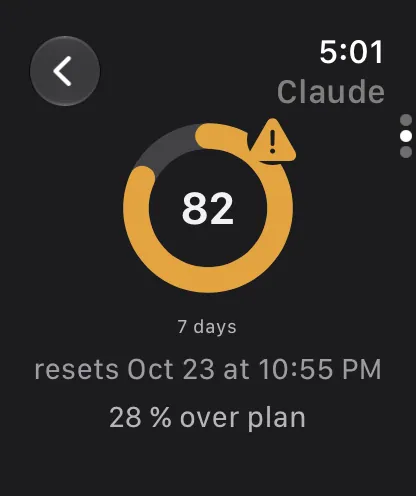
- Apple Watchon your wrist
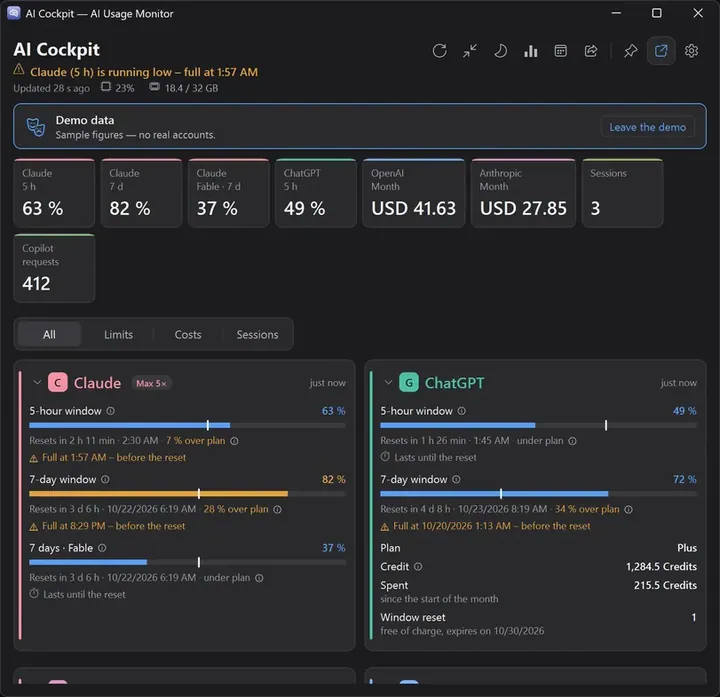
- Windowsnotification area
Same cards, same alerts, same look — on every device. What runs where →
Safe. Your sign-ins stay on your device. No server in between. Four documented security reviews →
AI limits and spend.
On one panel.
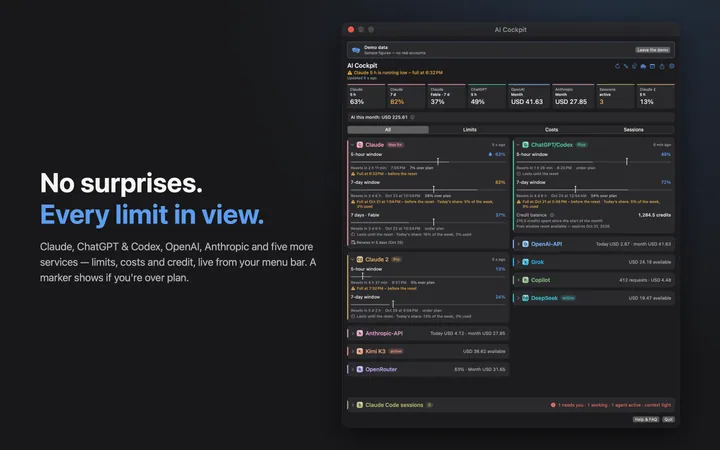
AI Cockpit puts the limits and the spend of nine AI services on one panel — Claude, ChatGPT & Codex, the Anthropic API, the OpenAI API, Kimi K3, OpenRouter, Grok, GitHub Copilot and DeepSeek. It only reads. Nothing passes through a server of mine.

What’s new
- Mac 7.8out nowWhat’s new →
- iPhone, iPad & Watch 2.19out nowWhat’s new →
- Windows 1.11out nowWhat’s new →
- Setup starts with your plans
- Claude and ChatGPT sign in right there
- Help & FAQ in the app
- Now also in French, Chinese, Hindi and Spanish
What it does with those numbers
New in each version, at a glance. Every feature in detail →
NewIn six languagesMAC + IOS + WIN
French, Chinese, Hindi and Spanish join German and English.Mac 7.8 · iPhone 2.19 · Windows 1.11
NewA gentler startMAC + IOS + WIN
Setup starts with your plans; developer keys wait folded away.Mac 7.8 · iPhone 2.19 · Windows 1.11
NewHelp & FAQ inside the appMAC + IOS + WIN
One click opens the first steps on aicockpit.info.Mac 7.8 · iPhone 2.19 · Windows 1.11
NewOne list for Claude Code and CodexMAC + WIN
Needs you, still running, idle.Mac 7.7 · Windows 1.10
NewClaude figures from Claude CodeMAC + WIN
When Anthropic slows the request, the card reads the status line.Mac 7.7 · Windows 1.10
NewOpenAI costs that hold upMAC + IOS + WIN
A missing day is named, never counted as zero.Mac 7.7 · iPhone 2.18 · Windows 1.9
NewDiagnostics that say whyMAC + IOS + WIN
A light per provider and a “Test now”.Mac 7.7 · iPhone 2.18 · Windows 1.9
NewProcessor and memory in the headerMAC + WIN
How busy your computer is, at a glance.Mac 7.7 · Windows 1.10
NewKnow before a plan renewsMAC + IOS + WIN
A note 1–7 days before Claude or ChatGPT renews.Mac 7.5 · iPhone 2.16 · Windows 1.8
NewA bell for every resetMAC + IOS + WIN
Hear from the app once a window is free again.Mac 7.5 · iPhone 2.16 · Windows 1.8
NewA daily share for the weekMAC + IOS + WIN
“9 % left for today so the week lasts.”Mac 7.5 · iPhone 2.16 · Windows 1.8
NewQuiet nights, and your AI monthMAC + IOS + WIN
Silent at night. On the 1st: what AI cost you.Mac 7.5 · iPhone 2.16 · Windows 1.8
NewYour limits in the terminalMAC + WIN
Your figures in the Claude Code status line.Mac 7.4 · Windows 1.7
NewOne sentence says where you standMAC + IOS + WIN
“All in the green” or “Claude is getting tight today”.Mac 7.4 · iPhone 2.15 · Windows 1.7
NewWhere to switchMAC + IOS + WIN
“Codex has 70 % left (5 h).”Mac 7.4 · iPhone 2.15 · Windows 1.7
NewNo surprisesMAC + IOS + WIN
A notice on off-schedule resets and cost spikes.Mac 7.3 · iPhone 2.14 · Windows 1.7
NewA control and four barsMAC + IOS + WATCH
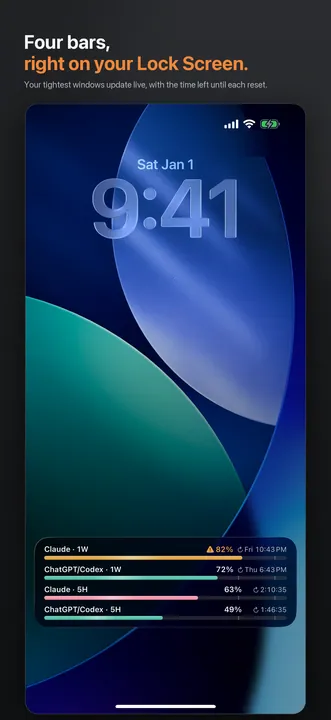
Control Center, Lock Screen, and a Live Activity with four bars.
NewYour colorsMAC + IOS + WATCH
Three color schemes and a color per card.Windows since 1.7
NewOver or under planMAC + IOS + WIN
A time marker in every bar: “28 % over plan”.
NewUsed — or what’s leftMAC + IOS + WIN
Read every quota the way you think.
NewA countdown that ticksMAC + IOS
The time to the next reset, every second.
NewDeepSeek, the ninth serviceMAC + IOS + WIN
Your balance per currency.
NewYour watch, your figureWATCH
A complication you set up yourself.
NewFind any settingMAC + WIN
A search field at the top of the settings.Windows since 1.6
NewHears about new versionsWIN
Checks once a day. Installs nothing.
NewWhen will it run out?MAC + IOS + WIN
“At this pace full at 6:48 PM — before the reset.”
Alerts before the wallMAC + IOS + WIN
A notice when a window crosses your threshold.
Widgets everywhereMAC + IOS + WATCH
Desktop, Home Screen, Lock Screen, StandBy, wrist.
The menu bar, your wayMAC
Both values, the most critical one, a ring or time left.
Live Claude Code sessionsMAC + WIN
Model, subagents, context window — and a heads-up.
Outages, namedMAC + IOS + WIN
The card says when a provider has an incident.
Demo modeMAC + IOS + WIN
Sample figures, no account. Look first, sign in later.
Ask it out loudIOS
Siri and Shortcuts answer from your figures.
Where your quota wentMAC + WIN
By project, model and hour, up to a year back.
Nine services. Up to eleven cards. One cockpit.
Every subscription and API you pay for, side by side — each with the one figure that decides whether you can keep working. Add only what you use; every card is optional. Claude counts twice if you want it to: a second account gets its own card.
All nine services run on all three platforms. DeepSeek shows a balance, not usage: it offers no usage endpoint, and the card says so. Claude Code sessions stay off the phone — they read what runs on the computer itself.
Download — one cockpit, five devices
Free on every device. You sign in once on each.
iPhone, iPad & Apple Watch
Widgets, Live Activity and your wrist. No Mac needed.
2.19 · what’s new
 Free · optional tip
Windows
The same cockpit in the notification area.
1.11.0 · not signed · what’s new
New here? Quick start → · Manual → · every release by date →
What runs where
Honest ticks only: a dash means it is not there.
| Feature | Macmenu bar | iPhone · iPad · WatchLock Screen · wrist | Windowsnotification area |
|---|---|---|---|
| Version today | 7.8 New in 7.8 — what’s new → | 2.19 New in 2.19 — what’s new → | 1.11.0 · unsigned New in 1.11 — what’s new → |
| Price | free | free · optional tip | free |
| Runs on | macOS 14+ | iOS 17+ · watchOS 10+ | Windows 11 · x64 + ARM |
| Get it from | Mac App Store | App Store | aicockpit.info (Setup) |
| Never caught out by a limit | |||
| Claude, ChatGPT & Codex, OpenAI, Anthropic, Kimi, OpenRouter, Grok, Copilot | yes | yes | yes |
| DeepSeek — the ninth service | yes | yes | yes |
| Warns before a limit hits — with a forecast of when | yes | yes | yes |
| “At this pace full at …” — a forecast under every window, no history needed | yes | yes | yes |
| Time marker: see at a glance if you are over or under plan | yes | yes | yes |
| Live countdown to the next reset | widget | Lock Screen | on the cards |
| Show quotas as used or as what’s left | yes | yes | yes |
| Outage notices straight from the status pages | yes | yes | yes |
| Alert on off-schedule resets and cost spikes | yes | yes | from 1.7 |
| One sentence on where you stand, and a tip on where to switch | yes | yes | yes |
| Reset alarm: one notification when a window is free again | from 7.5 | yes | from 1.8 |
| Daily share: how much today so the week lasts | from 7.5 | yes | from 1.8 |
| Quiet hours and “pause until tomorrow” | from 7.5 | yes | from 1.8 |
| Always in view | |||
| Gauge you never have to open | menu bar | Lock Screen | notification area |
| Widgets | yes | Home + Lock Screen | no |
| Refresh the widget with one tap | no | yes | no |
| Widget you set up yourself — one service or all | yes | yes | no |
| On your wrist: Apple Watch app and complication | no | yes | no |
| Watch complication you set up — service, window, used or left | no | yes | no |
| Live Activity and StandBy | no | yes | no |
| Ask Siri | no | yes | no |
| Control for Control Center | from 7.3 · macOS 26 | from 2.14 · iOS 18 | no |
| Costs under control | |||
| API spend today and this month | yes | yes | yes |
| Monthly budget for all API costs, with warnings | yes | yes | yes |
| Codex credit balance, in credits — never guessed dollars | yes | yes | yes |
| Where your Claude and Codex quota went — by project, model, hour | yes | no | yes |
| Renewal calendar: a note before a plan renews | from 7.5 | yes | from 1.8 |
| “Your AI month”: what AI cost you last month, as an image to share | from 7.5 | yes | from 1.8 |
| A short daily summary | yes | no | no |
| For Claude Code users | |||
| Live Claude Code sessions, with a warning before the context window fills | yes | no | yes |
| Claude Code and Codex in one sessions card — needs you, running, idle, mark as seen | from 7.7 | no | from 1.10 |
| Your limits in the Claude Code status line — how | yes | no | from 1.7 |
| Second Claude account | yes | yes | yes |
| Open with a keyboard shortcut | yes | no | yes |
| Settings and updates | |||
| Accounts at a glance — every service, its state, a page each | yes | yes | yes |
| Search the settings | yes | no | yes |
| Hear when a new version is out | App Store | App Store | yes |
| Trust | |||
| No account, no server in between, no telemetry | yes | yes | yes |
| Only reads — creates, changes and deletes nothing | yes | yes | yes |
| Reads no browser cookies and keeps none | yes | yes | yes |
| Credentials stay in | Keychain | Keychain | Credential Manager |
| From the App Store — one click, no security warning | yes | yes | no |
| Sandbox, enforced by macOS and iOS — not just promised | yes | yes | no |
| Signed and notarized | yes | yes | no |
| Automatic updates — fixes reach everyone | yes | yes | by hand, with a notice |
| Public security log — four documented reviews | yes | same core | no |
| Demo mode — look around before signing in | yes | yes | yes |
| English and German | yes | yes | yes |
| Also French, Simplified Chinese, Hindi and Spanish | from 7.8 | from 2.19 | from 1.11 |
Every release, by platform and date — how often each app gets updated →
Free, and nothing sold on the side
All three are free — Mac and iPhone on their App Stores, Windows from this site. No trial that expires, no feature held back for a paid tier. No subscription, no account with me, no usage limit. The subscriptions and API credit the cockpit reads are ones you already hold and pay for at the providers themselves.
It is paid for by a tip jar in the app, under Settings → About. It unlocks nothing and changes nothing — there is no paid tier to buy into. The long answer is in the FAQ.
- Sign-ins and keys stay only in your device’s secure storage
- Direct connection to the official APIs — no server of mine in between; the app sends no usage data and shows no ads
- The app only ever reads with a key: it creates, changes and deletes nothing
- Built by an indie developer in Switzerland — no VC, no data business (legal notice · Contact)
Four documented security reviews, the last against version 5.0 — details. Done with Claude, not an external audit; the record names every server the app ever talks to. More in the privacy policy and the FAQ.
Convinced? All three are free: AI Cockpit for Mac · AI Cockpit for iPhone (iOS 17 and up) · AI Cockpit for Windows.
Feedback and ratings
Wish for a feature? Found a bug?
Missing a provider or a figure? Tell me — short is fine. I read every message.
Rate it in the App Store
A rating helps other people find AI Cockpit. Half a minute is enough.
Rate the Mac app Rate the iPhone appOn Windows? There is no store — tell me in the form.
Ready for the cockpit?
Get it done — ready in a minute.
Mac, iPhone and Watch come from their App Stores, Windows from this site — free, no subscription, no account with me: just the provider accounts you already have.
All three: free · no subscription · an optional tip in the App Store apps
The subscriptions and API credit the cockpit reads are yours and stay with your providers — it adds no cost of its own. If you do leave a tip and change your mind, that goes through Apple, at reportaproblem.apple.com.