FAQ
Last updated: 13 October 2026 · Deutsch
Short answers to the questions that come up most — about limits not showing, keys, folders, pricing and the two separate apps. Nothing here replaces the Privacy Policy or the Security page; it just points at them where they have the full answer.
Is it for you?
Honest answer: maybe not. It costs nothing, so the only thing at stake is your time — here is the sorting, before you install it.
What it's built for
People who pay for more than one AI service and are done checking each one in its own corner. Who need the numbers on the train, between meetings, on the sofa — not only at the desk. Who would rather glance at the watch than open an app. And who want to know what AI costs them per month — subscriptions and API spend, added up as one figure. Who keep hitting a Claude rate limit mid-task and want the warning before the wall, not after it.
That is also the gap this cockpit fills: menu bar tools exist for the Mac only, and the usage trackers on iOS stop at Claude. Nine services on iPhone, iPad and Apple Watch — that is what this app is for.
What it's not built for
If you use only Claude and sit only at your Mac, one of the free menu bar tools will show you that window just as well — that deserves saying plainly. This app starts earning its keep when the phone, the watch or the monthly total come into play.
And if you want to read the source before you hand an app an admin key: it isn't published. The security record documents where the app connects and what four review passes found — a record, though, not the code.
Why can't I see my limits?
Every card fetches directly from its own provider, so it only shows numbers once that specific service is connected — sign in to Claude, or add the matching key in Settings → Accounts. A card with nothing configured for it stays empty on purpose rather than guessing at a figure. If a card is configured but its request fails, it shows a plain-language error of its own — no internet connection, service unreachable, and so on — with a Retry right there on the card, instead of raw system text.
Do I need a ChatGPT subscription?
You need whatever lets you use ChatGPT and Codex in the first place; the card itself adds no requirement of its own. On the Mac, AI Cockpit fetches the figures live since version 6.5, after a one-time sign-in in the app — there is no API key to enter for this one. If there is no sign-in, or the fetch fails, the card falls back to the session logs of a locally installed Codex. On iPhone and iPad there is no local Codex to read from, so the mobile app has you sign in to ChatGPT directly.
Where are my keys stored?
On the Mac, every API key and Claude sign-in token lives exclusively in the macOS Keychain, tied to that one device. On iPhone, iPad and Apple Watch it is the device's own keychain — the Watch itself never holds a credential at all; it only receives figures already computed on your paired iPhone. Nothing is copied to a server of mine, and a key leaves the device only as authentication toward the provider it belongs to.
Does AI Cockpit read browser cookies?
No. AI Cockpit reads no cookies from any browser, and its own connections neither accept nor keep cookies.
That matters: malware that steals session cookies from browsers is a real risk — with a stolen cookie, someone gets into your account without your password or second factor. An app that read those cookies would be one more place to steal them from.
AI Cockpit takes the routes the providers offer instead: a sign-in for the Claude and ChatGPT subscriptions, and API keys you enter yourself. Both stay in the keychain of this device — on Windows, in the Windows Credential Manager — and the app only ever reads with them. For one figure this means doing without: the Claude credit balance would only be reachable through your browser session cookie, so the app does not show it (see below and the security record).
Why does the Mac app ask for a folder?
The Active Sessions card reads Claude Code's own session files from
~/.claude — that is the only way to show what is running on
this Mac, and that card needs the folder. The ChatGPT/Codex card asks for
~/.codex only for its fallback: sign in to ChatGPT inside the
app and no folder grant is needed at all. The Mac App Store build is
sandboxed, so it has to ask for a folder explicitly; access is read-only,
granted once, and can be released again any time through "Reset
everything" in Settings. One exception from 7.4: if you switch on
the status for the terminal, the app writes its own
small file to ~/.claude/aicockpit/ — nothing else.
How do I show my limits in the Claude Code status line?
With AI Cockpit for Mac 7.4 or later, or for Windows 1.7 or later. It is off by default:
- Switch on Settings › Diagnostics › Provide status for the terminal.
- Press Copy command and paste the
statusLineblock into Claude Code'ssettings.json.
From then on the app writes a small file, stand.json, after every
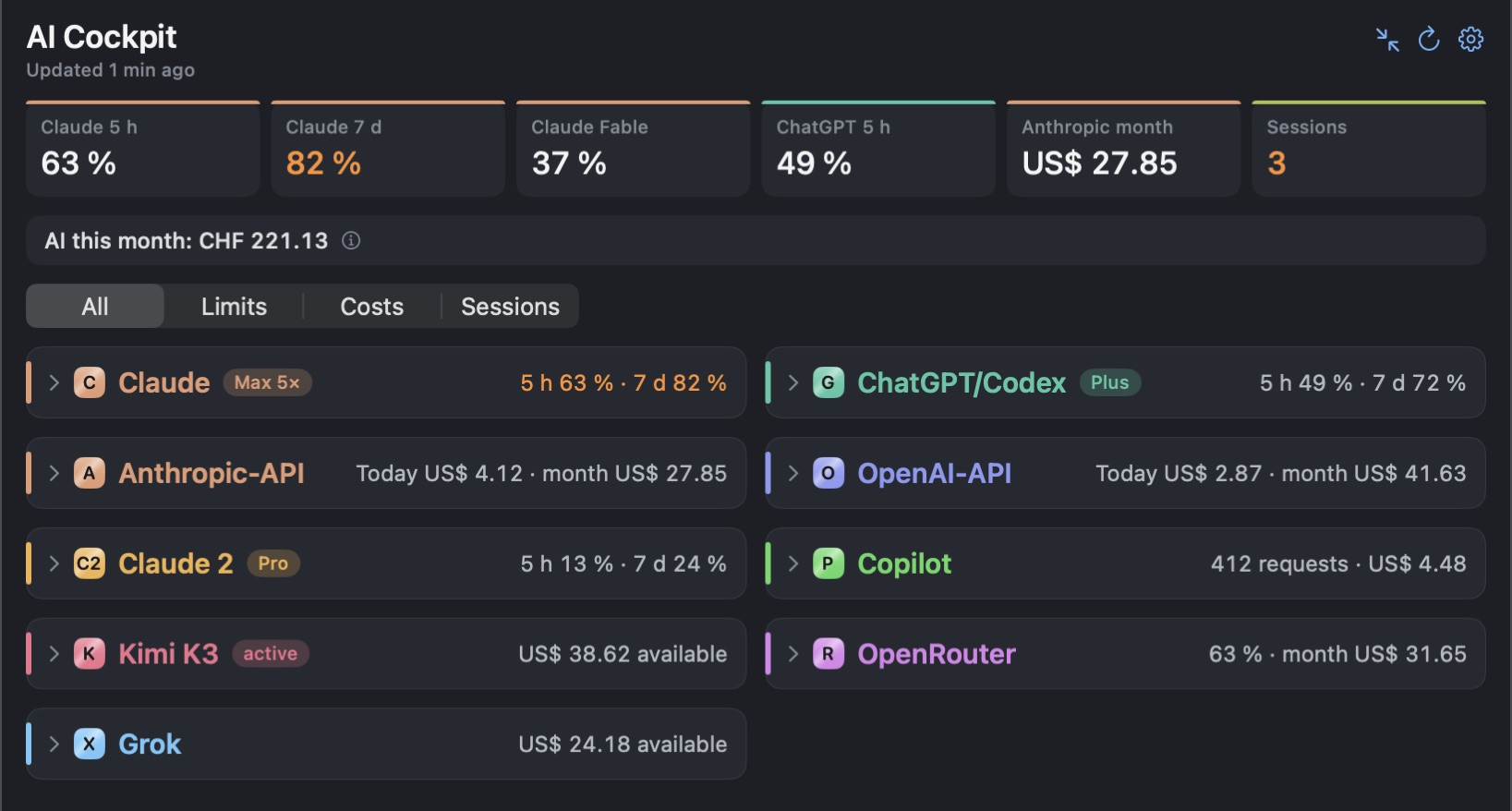
refresh, and Claude Code shows a line like “Claude 63 % · Codex 49 % · OpenAI
$2.87”. The file holds percentages, reset times and amounts — no keys,
no account names, no projects.
On the Mac it lands in ~/.claude/aicockpit/ once you have granted
the .claude folder; without that grant it stays in the app's
container, where a terminal cannot read it, and the settings tell you so. On
Windows it lands in %USERPROFILE%\.claude\aicockpit\, next to the
script statusline.ps1. Switch it off and the app removes file and
script. Nothing leaves your computer.
Mac 7.4 → · Windows 1.7 →
Can I mute notifications at night?
Yes, from iPhone 2.16 and Windows 1.8, and on the Mac from 7.5. Switch on Quiet hours under Settings › Notifications and pick from and to — 22:00 to 07:00 by default, across midnight. In that time the app stays silent. Let cost alerts through, on by default, lets the cost alert and the budget alert pass.
For a single night there is pause until tomorrow: on the Mac the moon button in the panel or the right-click menu of the menu bar icon, on the iPhone the settings, a Shortcut or the band above the cards, on Windows the tray icon’s menu. It mutes everything until quiet hours end, or until 7 AM. A reset alarm you set yourself still comes through. Mac 7.5 → · iPhone 2.16 → · Windows 1.8 →
Why does it want an admin key for OpenAI or Anthropic?
OpenAI and Anthropic only expose cost and usage figures through their admin-level API keys — an ordinary project key returns nothing there, so there is no gentler option for this one card. AI Cockpit only ever reads with that key: it creates, changes and deletes nothing in your account. The full account of what the key can and can't do is on the Security page.
Why does my GitHub Copilot card show nothing?
GitHub only exposes Copilot usage figures for personally paid plans. If your seat is managed by a company or organization, GitHub reports usage at the organization level only — there is no per-user figure for the app to read, on either Mac or iPhone.
Why does the DeepSeek card show a balance but no usage?
Because DeepSeek only hands out the balance. Its API has an endpoint for the balance per currency — what you topped up and what was granted — but none for usage or spend. The card shows what exists and says what is missing; it does not invent a spend figure. For the same reason DeepSeek does not count toward the monthly budget or the total costs. DeepSeek is on Windows since 1.5 and on iPhone since 2.11; and on the Mac since 7.2.
Why do I see ChatGPT credits but no Claude credits?
Because only one of the two hands them out. OpenAI exposes credit and reset figures through the same interface the app already uses for your ChatGPT quotas. Anthropic offers no equivalent for a personal Pro or Max plan — their documented admin interface covers organisations only, and the one route that does carry the figure would require handling your browser session cookie, which this app will not do (see the Security page). It is not a missing feature on the app's side; the number simply is not available to a third-party app.
How much does it show in the menu bar?
Both values, only the most critical one, a ring or the time remaining — you decide how much space the cockpit takes up top.
- Both values

- Ring

- Most critical value

- Time remaining

Can I make the cards smaller?
Cards collapse to a single line; the key figure stays in the header. Light and dark mode selectable — dark is the default.
What can I change about it?
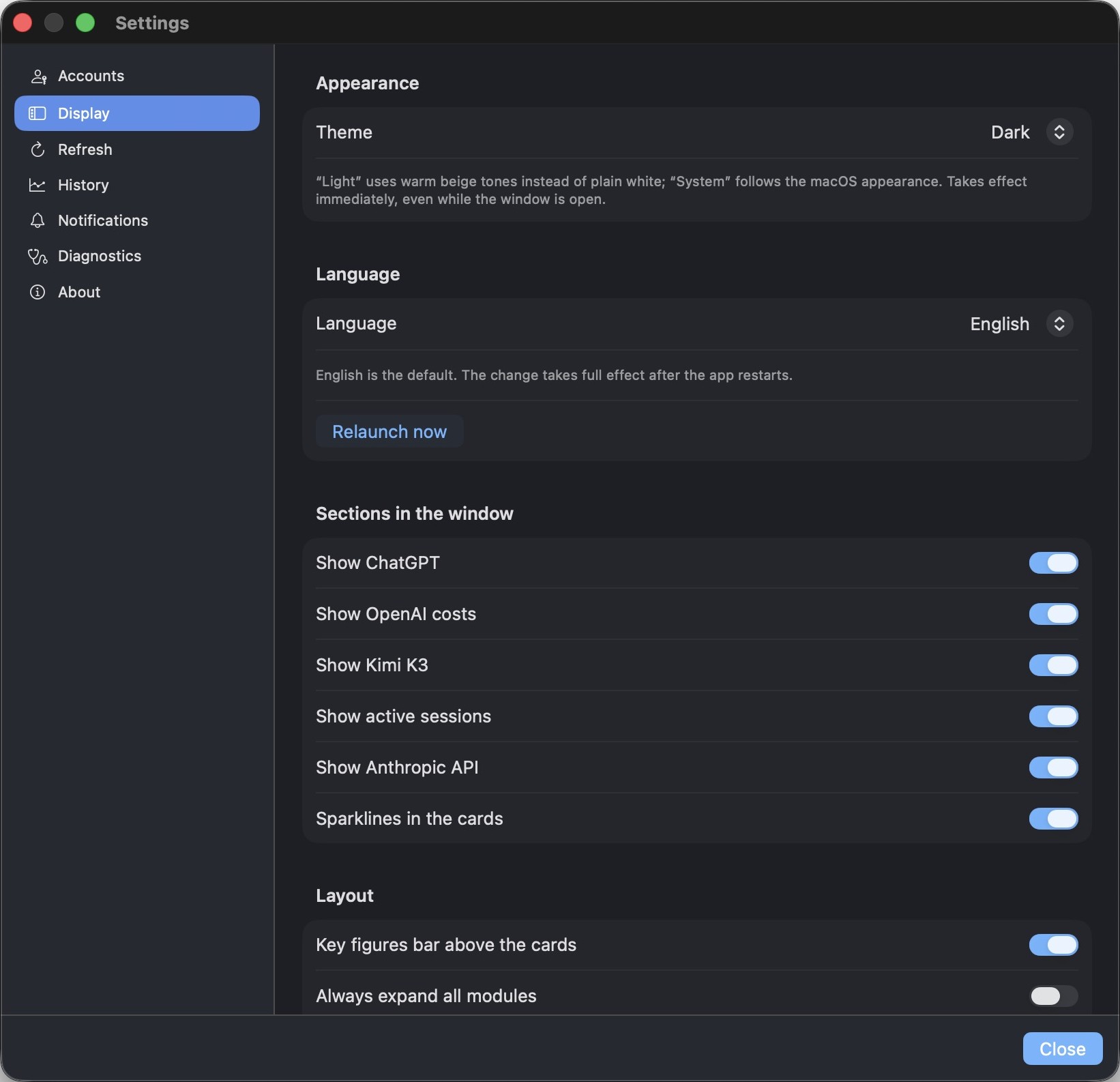
The cockpit adapts to how you work — not the other way around.
- Dark (default), warm light theme, or follow the system
- Since Mac 7.3 and iPhone 2.14: three colour schemes — Graphite, the new default, Deep Blue and Classic, the look up to now — and a colour of your own for each card
- English or German interface — switch anytime
- Show only the cards you actually use
- Alert thresholds, refresh rates and history — all yours to tune
What does the app actually cost?
Nothing. Both apps are free — AI Cockpit for Mac on the Mac App Store, AI Cockpit for iPhone, iPad and Apple Watch on the App Store. No subscription, no account, no ads, nothing sold on the side. There is a tip jar under Settings → About if you want to leave something: Espresso, Cappuccino or Dinner. It unlocks nothing and changes nothing about the app — it is in AI Cockpit for iPhone and since 6.5 on the Mac too. The subscriptions and API credit the app displays are ones you already hold and pay for directly at Anthropic, OpenAI, Moonshot and the rest — the cockpit adds no cost of its own.
Free — where is the catch?
Nothing. That is the whole answer — but here is what stands behind it, because «free» usually has a catch and this one does not.
The download is free
Both apps, on both App Stores. No trial that expires, no starter edition, no feature held back for a paid tier. What you install is the whole thing.
Using it is free
No subscription, no account with me, no usage limit. The subscriptions and API credit the cockpit reads are ones you already hold and pay for at Anthropic, OpenAI and the rest — it adds no cost of its own, and it cannot spend anything on your behalf: the app only ever reads with a key — it creates, changes and deletes nothing. It cannot narrow what a key is allowed to do; that stays with your provider.
Nothing is sold on the side
No ads, no analytics, no telemetry, no data sold or shared. There is no server of mine that could collect any of it — see the privacy policy.
So how is it paid for?
By a tip jar in the app, under Settings → About: Espresso, Cappuccino or Dinner, once or as often as you like. It unlocks nothing and changes nothing — a lot of evenings went into this, and that is the only way the app earns anything. It is there in AI Cockpit for iPhone today; on the Mac it is there since 6.5.
A price tag on a tool like this mostly buys hesitation, and the people who would find it useful already pay for four AI subscriptions. So it is free, and whether it is worth anything to you is a question you can answer later — from inside the app, once you know.
Is there a trial version?
There is no separate trial, but demo mode does the same job once you have installed the app. On the Mac it shows up in the setup assistant on first launch and afterwards in Settings → Accounts → "Try it out"; on iPhone and iPad, tap "Sign in" on the Claude card and then "View demo". Every card fills with sample figures, with no sign-in and no keys entered anywhere. Nothing is fetched and nothing you configure later gets overwritten while it runs. Since the app is free, there is nothing to decide beforehand anyway: install it, look around in demo mode, then sign in — or don't.
How do I get a refund?
The apps themselves are free, so there is nothing to refund. If you left a tip and changed your mind, that goes through Apple, not through me, since Apple handles the payment. File the request at reportaproblem.apple.com.
Why are Mac and iPhone two separate apps?
They have their own bundle identifiers and their own App Store listing —
AI Cockpit for Mac (com.ipstyle.aicockpit) and AI Cockpit
Mobile for iPhone, iPad and Apple Watch — built from the same shared core
but published on their own. Since both are free, this costs you nothing
beyond two downloads. They do not share settings or sign-ins either: each
device keeps its own credentials in its own keychain, which is deliberate
(see the security record).
Does the app collect data?
No. AI Cockpit has no server of its own, no telemetry and no analytics —
it is a native app that talks directly to the providers you configure.
The Windows edition, from 1.5, also asks api.github.com once a
day whether a newer version is out — without credentials, and it can be
switched off. For the full picture, including this website's own server logs and its
optional feedback form, see the Privacy
Policy.
Where do I read up on this?
Three pages go into the detail this FAQ has to skip: monitoring Claude usage limits, understanding Codex quotas and reset times, and keeping track of AI API costs — each one says plainly what the app can and cannot know.